
If you’ve spent any time in the creative space lately, you’ve likely felt the “tab fatigue” that comes with modern AI. One window is open for generating a background, another for animating a clip, and a third for trying to sync audio that never quite fits. It’s a fragmented workflow that often creates more friction than it solves.
MakeShot enters this space not as just another tool, but as a unified studio designed to collapse that distance between an idea and a finished asset. By bringing together heavy-hitting models like Veo 3, Sora 2, and Nano Banana into a single interface, it addresses the primary hurdle for most small teams: the steep learning curve of professional production.
Here is a structured look at how this platform changes the math for creators, moving from technical confusion to repeatable, professional-grade output.
The Shift from Prompt Engineering to Creative Direction
For a long time, using an AI Video Generator felt like a game of chance. You would type a prompt, cross your fingers, and hope the physics of the world didn’t collapse in the resulting five-second clip. The barrier to entry wasn’t just the cost; it was the “hidden tax” of time spent learning how to talk to a machine.
What I’ve noticed in my own workflow is that the most successful creators are moving away from being “prompt engineers” and becoming “creative directors.” MakeShot facilitates this by offering a predictable environment. Instead of guessing which model might handle a specific lighting request, you have access to a curated selection of industry leaders.
When I first started experimenting with these tools, I felt overwhelmed by the technical jargon. However, once I stopped trying to “hack” the AI and started using the unified interface to compare outputs side-by-side, the process became intuitive. It’s less about knowing the code and more about knowing what a good frame looks like.
Navigating the MakeShot Ecosystem: A Model Breakdown
The core strength of MakeShot lies in its variety. Not every project requires the same engine, and understanding which “specialist” to hire for your task is the first step toward a professional result.
The Specialists: Veo 3, Sora 2, and Nano Banana
Each model within the platform serves a distinct purpose in the production pipeline:
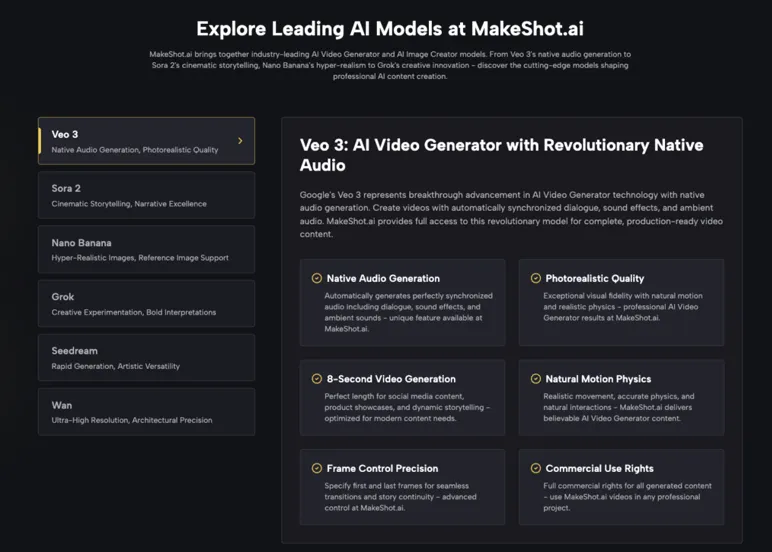
- Veo 3: This is the workhorse for creators who need “complete” content. Its standout feature is native audio generation. It doesn’t just create a silent clip; it generates synchronized dialogue and ambient soundscapes, which solves one of the biggest bottlenecks in video production.
- Sora 2: When the goal is cinematic storytelling, this is the go-to AI Video Generator. It handles complex physics and long-form consistency better than most, making it ideal for B-roll or establishing shots that need to look like they were filmed on a high-end cinema camera.
- Nano Banana: This is the specialist for the AI Image Creator side of the house. It focuses on hyper-realism and supports up to four reference images, which is a game-changer for maintaining brand or character consistency.
Model Comparison at a Glance
| Model | Primary Strength | Best For… | Key Differentiator |
| Veo 3 | Audio-Visual Sync | Social Media & Ads | Integrated sound effects & dialogue |
| Sora 2 | Cinematic Depth | YouTube & Film B-roll | High-fidelity physics and motion |
| Nano Banana | Hyper-Realism | E-commerce & Branding | 4-image reference consistency |
| Seedream | Speed | Rapid Prototyping | Near-instant visual feedback |
Practical Workflows: Moving from Chaos to Consistency
For a solo marketer or a small team, “consistency” is the hardest thing to achieve. It’s easy to make one cool image; it’s very hard to make ten images that all look like they belong to the same brand.
The “Reference-First” Approach
One of the most effective workflows I’ve adopted involves using the AI Image Creator to set the “visual DNA” of a project before touching video. By using Nano Banana and uploading specific reference photos of a product or a brand’s color palette, you ensure the AI isn’t just guessing.
Once you have that “hero image,” you can use it as a foundation for your AI Video Generator prompts. This prevents the “drifting style” problem where every clip in a campaign looks like it was made by a different person.
Scaling Social Media Content
In my experience, the biggest drain on a marketing budget isn’t the big “hero” video—it’s the daily need for fresh content for TikTok or Instagram. MakeShot allows you to take a single concept and iterate on it rapidly. You can generate a base scene in Sora 2, then use Veo 3 to create five different variations with different audio tracks to see which one resonates best with your audience.
Bridging the Gap for Non-Experts
The “professional-grade” label often scares people off because they assume it requires a degree in DaVinci Resolve or Photoshop. But the real value of a unified platform is that it abstracts the complexity.
Eliminating the Technical Overhead
When you use a standalone AI Image Creator, you often have to worry about aspect ratios, upscaling, and file formats across different sites. MakeShot handles the “plumbing” in the background. You focus on the visual intent, and the platform ensures the output is high-resolution and ready for broadcast or commercial use.
A Note on Commercial Freedom
A significant hurdle for many teams is the legal gray area of AI content. One of the most reassuring aspects of this platform is the clarity regarding ownership. Knowing that the content generated—whether it’s a cinematic sequence from Sora 2 or a product mockup from Nano Banana—comes with full commercial usage rights allows teams to move from experimentation to actual deployment without legal hesitation.
Real-World Applications Across Industries
The versatility of an integrated AI Video Generator and AI Image Creator means it can be applied to almost any visual-heavy field.
- E-Commerce: Instead of paying for a full-day photoshoot for every new product color, you can use Nano Banana to visualize products in diverse, hyper-realistic settings.
- YouTube Production: Creators can fill gaps in their storytelling with cinema-grade B-roll. If you’re talking about a concept but don’t have the footage to show it, Sora 2 can generate that specific scene in seconds.
- Marketing Agencies: The ability to respond to trends instantly is a massive competitive advantage. When a new meme or cultural moment happens, you can produce a high-quality ad creative while the trend is still peaking, rather than a week later.
The Future of the Creative Studio
The transition from traditional production to AI-assisted creation doesn’t have to be a jarring leap. It’s more of an evolution of the toolkit. By centralizing models like Veo 3, Sora 2, and Nano Banana, MakeShot effectively lowers the floor for beginners while raising the ceiling for professionals.
The key takeaway for any creator looking to adopt these tools is to start with the “why.” Don’t just use an AI Video Generator because it’s new; use it because it allows you to tell a story that was previously too expensive or too complex to film.
As the technology continues to mature, the winners won’t be the ones with the most technical knowledge, but the ones who can most effectively use an AI Image Creator to bridge the gap between their imagination and the screen. MakeShot provides the canvas; the vision is still entirely yours.
