
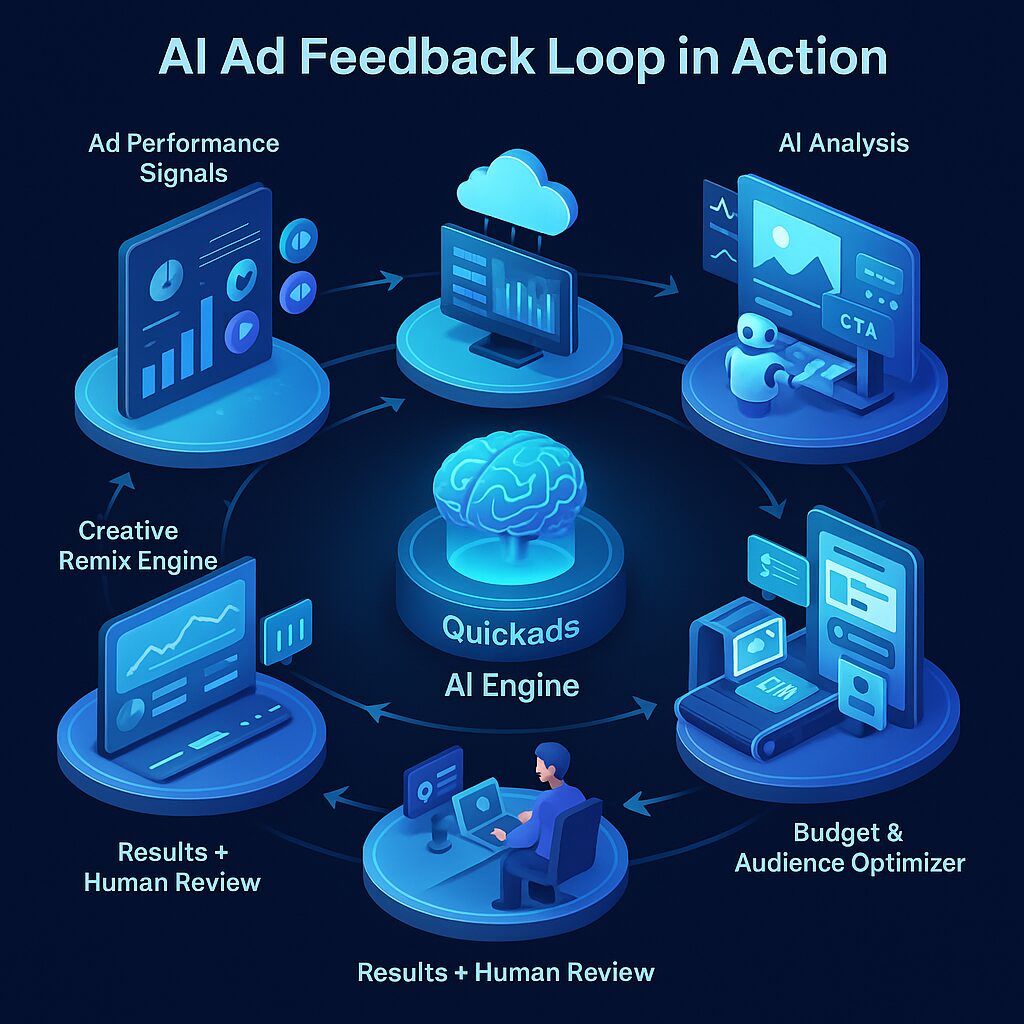
Let’s be honest—if you’re still waiting weeks to optimize ads, you’re burning budget. AI ads don’t play by old rules. They’re alive. They learn. And they need constant feedback to evolve. Not next quarter. Not next week. Right now.
You might be wondering: what makes one AI ad campaign skyrocket while another tanks? It usually comes down to how tightly you’ve built your feedback loop. Real data fuels real results. No fluff. No guessing.
Think of the Feedback Loop as Your AI Ad’s Nervous System
Here’s the thing: an AI ads without a feedback loop is like a self-driving car with no sensors. Blind. Risky. Likely to crash.
Platforms like Meta Advantage+ and Google Performance Max thrive on continuous inputs—impressions, scrolls, clicks, conversions—and they tweak campaigns dozens of times a day. That’s the loop in action. Real-time recalibration. And guess what? You can make it work in your favor if you stop setting and forgetting.
The Core Loop: Break It Down So You Can Build It Better
Let’s zoom in:
1. Data Collection: Don’t Wait for Conversions
These early signals help you iterate before your budget burns:
a. Video Watch Rates – Measure 3-second, 15-second, and 50% completion rates. If drop-offs are high early, your hook’s off. Time to rework the opening frame or headline.
b. Add-to-Cart Events – Crucial for ecommerce. If people add but don’t buy, test urgency cues or shipping info clarity.
c. Form Interactions – Are users starting but not submitting? Maybe your form is intimidating or your offer isn’t strong enough. Simplify.
d. Scroll Depth – If people stop at 30% scroll, rework your visual hierarchy or place CTAs higher.
e. Dwell Time – Less than 10 seconds? Either your page didn’t match the ad promise, or it’s slow/confusing. Investigate both.
2. Data Integration: Stop the Silo Madness
Make your stack work together, not in isolation:
a. Audit Your Stack – Map every tool collecting data—ads, CRM, support, email, reviews. Identify redundancies.
b. Pick a Central Hub – Tools like Segment, Triple Whale, or Google Tag Manager can stitch data across touchpoints.
c. Sync in Real-Time – Real-time or near-real-time is the goal. Batch updates delay optimization.
c. Clean & Normalize – Standardize UTM parameters, naming conventions, and tags to keep reports usable.
3. AI-Powered Analytics: Pattern > Gut Feel
This is where AI earns its keep:
a. Descriptive Analysis – See what’s actually happening. Use dashboards to break down performance by segment, placement, or creative.
b. Predictive Analysis – Let AI tools flag which ads are likely to decline or which audience may convert more next week.
c. Sentiment Monitoring – Use tools like Brand24 or Sprinklr to classify social comments and reviews.
d. Creative Fatigue Detection – A declining CTR, increasing frequency, and reduced engagement often mean ad fatigue. Rotate assets before performance dips hard.
e. Brand Shift Tracking – If audience questions change (“Is it vegan?” vs. “Does it ship fast?”), shift messaging accordingly.
Build a Feedback Loop That Performs Like a Pro
Step 1: Define KPIs That Actually Matter
a. For Ecommerce – ROAS > 3x, AOV growth, cart-to-purchase rate > 20%.
b. For SaaS – CPL under threshold, CAC payback < 6 months, CLTV growth.
c. For B2B – Cost per SQL < $200, Sales cycle < 45 days.
d. For UGC Campaigns – Share rates > 5%, 10+ comments per ad, sentiment > 70% positive.
e. Visual Dashboards – Use tools like Databox or Looker to display KPIs in a team-visible way.
Step 2: Capture Early Signals Fast
UTM Tracking – Helps attribute behaviors to campaigns. Use consistent UTM naming.
Heatmaps (e.g., Hotjar) – Reveals user pain points on landing pages.
Feedback Polls – Ask “What stopped you from buying today?” or “Was this ad helpful?”
Hook Testing – Run versions with different intros and track thumb-stopping rates.
Emotional Reactions – Use like/love/laugh/angry on Facebook ads as additional sentiment signals.
Step 3: Auto-Tag and Categorize Feedback
AI Tagging Tools – Use Qualtrics, MonkeyLearn, or ChatGPT for clustering comments.
Tag Creatives Properly – Track which element (hook, CTA, offer) each feedback point refers to.
Flag Deal-Breakers – Comments like “Scam?” or “Too expensive” should be routed to sales or pricing.
Trends Over Time – Use weekly reports to see if certain feedback is spiking.
Update Brief Templates – Feed learnings back into copy decks, design briefs, and script outlines.
Step 4: Auto-Generate and Test Creatives
Use Creative Intelligence – Tools like AdCreative.ai or Pencil analyze past winners to recommend new combinations.
Single-Variable Testing – Only change one element at a time (image vs headline) to isolate impact.
Multivariate Testing – Great for high-volume campaigns. Use if you’re spending >$500/day.
Predictive Prioritization – Let AI rank variants based on modeled performance before you spend real budget.
Double Down on Winners – Once you find a hit, replicate it across channels (e.g., same hook for YouTube Shorts).
Step 5: Real-Time Budget Shifts
Set ROAS Rules – e.g., increase budget by 20% if ROAS > 4x for 48 hrs.
Kill Fast – If CPA spikes 30% above average, pause immediately.
Smart Lookalikes – Clone converting audiences to find more of the same.
Predictive Budgeting – Use tools like MadgicX to forecast returns before reallocating.
Track Platform Volatility – On weekends or holidays, ad costs shift. Prepare with pre-set rules.
Tactical Moves: How to Iterate With Precision
1. Predictive Signals > Conversions – Look for intent indicators: 3+ page views, form starts, or save-to-cart events.
2. Automated Creative Workflows – Set up AI templates that remix copy for new offers automatically.
3. Smart Spend Rules – Use if/then logic: “If ROAS drops below 1.2x for 3 days, cut spend by 25%.”
4. Sentiment + CTR Blending – High clicks + poor comments? You’ve got a misaligned promise. Adjust copy.
5. Cross-Channel Feedback – Map email opens + ad clicks + customer support tickets to build complete journeys.
Top Tools for Smarter Feedback Loops
1. Quickads – Excellent for small teams needing quick iterations. Great ad performance insights built-in.
2. MadgicX – A power tool for managing budgets and dynamic audiences across platforms.
3. AdCreative.ai – High-volume ad creative generation. Ideal for lean creative teams.
4. Abyssale – Use this if you’re localizing ads for different geos. Super efficient bulk editing.
5. Superside – Combines AI support with human designers. Fast creative turnaround with strategic input.
What Could Trip You Up (And How to Avoid It)
1. Tracking Limitations – Use modeled conversions from Meta + GA4. Also use server-side tracking tools like Segment.
2. Data Silos – Integrate. Use tools like Zapier, Segment, or CDPs. Manual exports kill speed.
3. Vanity Metrics – 1,000 likes mean nothing if there’s no purchase. Focus on sales, not smiles.
4. Over-Iteration – Don’t change creatives every 2 days. Wait for statistical significance (usually >1,000 impressions).
FAQs
1. How often should I tweak my AI ads?
Every 24–48 hours based on engagement data. Use predictive signals, not just conversion lag.
2. Can AI ads auto-adjust based on feedback?
Yes. Platforms like Meta Advantage+ and tools like Quickads do this natively.
3. What data should be in the loop?
Quantitative (CTR, ROAS, scroll depth) + qualitative (sentiment, comments, reviews).
4. Do these tools create new ads themselves?
Yes. Quickads, AdCreative.ai, and Pencil all auto-generate ad variants based on performance inputs.
5. How do I iterate if tracking is restricted?
Combine modeled conversions, first-party data, user session recordings, and predictive AI.
In the End
Your AI Ads Are Only as Smart as Their Feedback Loop
You want scale? You want performance? Then you need a real-time, smart-as-hell feedback loop. Not just to survive—but to thrive.
If you’re still guessing your way through creative changes or manually managing bids, it’s time to upgrade your system. Let AI handle the heavy lifting—but feed it the data it needs to work its magic.
Because the better your loop, the better your results.
Need help building yours? Just say the word.
