
Long documents, endless slides, and long meetings don’t always work well these days. This is because people have less time and shorter attention spans. That is why explainer videos have become popular. They share clear information in a way that is easy to watch and remember.
Explainer videos are not just fun extras for businesses. They are useful for training employees, sharing new policies, explaining products, or helping customers understand services. However, making these videos the old-fashioned way can be expensive and take a lot of time.
Vidnoz AI: An Efficient Tool for Corporate Explainer Videos.
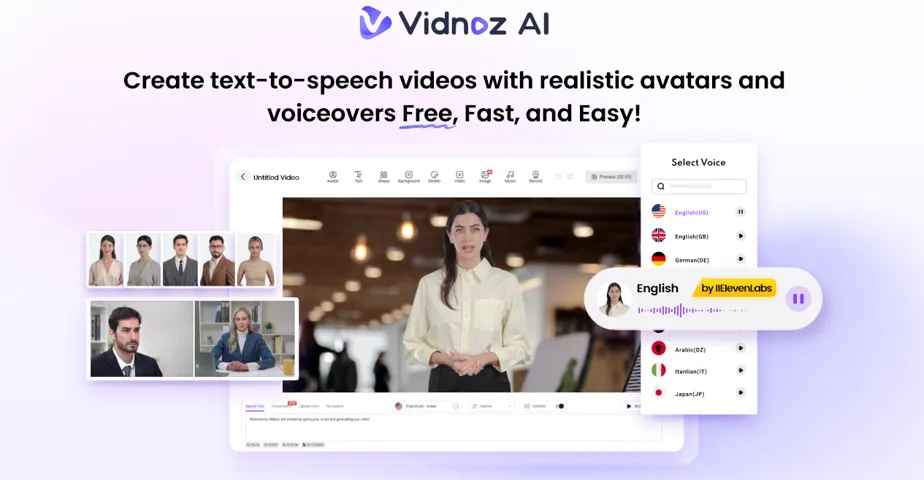
Vidnoz AI is a smart tool that helps companies to create explainer videos quickly and in large numbers. You don’t need cameras, actors, or studios. Everything is made inside the platform using AI avatars, voices, and templates.
What is really important here is that Vidnoz AI is ISO/IEC 27001:2022 certified. This means it follows strict global rules to keep your information safe. So, your training materials, scripts, and internal updates are protected while you create and store them.
Vidnoz AI lets businesses focus on making great videos that get results without worrying about data safety. It does so by combining strong security with easy-to-use tools.
Different Types of Explainer Videos You Can Make with Vidnoz AI
Explainer videos come in many shapes, and Vidnoz AI makes it easy to create all kinds quickly:
- Training Modules
Short videos for teaching new hires or showing new processes. Every employee gets the same info no matter where they work. Plus, you can update them fast when things change.
- Product Overviews
Videos that explain how a new tool or service works for employees or customers. Viewers get a simple and clear walkthrough they can watch anytime instead of reading long documents.
- Policy Guides
You can create easy-to-understand videos that explain company rules or compliance. They turn complicated legal or HR info into clear messages. These guides help global teams follow along with subtitles or different languages.
- Customer Education
Short clips that answer common questions or show how to use a product. This helps customers to solve problems quickly and reduces support calls.
- Internal Updates
Messages from company leaders shared consistently across all offices. Everyone hears the same message at the same time. Leaders can even appear as avatars which is making communication professional and clear.
You can use explainer videos in every part of your company not just marketing with Vidnoz AI.
Key Features That Make Vidnoz AI Great for Explainer Videos?
Here are the main features that make Vidnoz AI an easy and useful tool for creating explainer videos:
1,830+ Lip-Sync AI Voices
These voices cover many languages, accents, and tones. They sound clear and natural, helping your message connect with different teams or customers worldwide without needing to hire voice actors.
2,800+ Templates
Select from thousands of pre-designed templates for training, marketing or internal messages. You can insert your logo, brand colors, and custom text to maintain the appearance of the videos as professional and branded. This feature not only make video generation easier but saves time as well.
Free Daily Access
Every user gets 2 minutes free each day. This is perfect for testing ideas, sending quick reminders, or trying out videos before committing to a plan. Small teams can experiment without any cost.
1,700+ Avatars
Pick avatars from many professions like teachers, doctors, or business leaders.
- You can use quick Avatar Lite options for on-the-go explainer video creation.
- You can also create a custom digital version of your own trainers or leaders with Custom Avatar Pro. These avatars make videos feel more personal and human.
- Motion Avatars don’t just stand still. They move naturally with gestures and expressions. This makes your videos more interesting and helps explain situations or roleplays clearly.
All these features together let businesses make polished, engaging videos easily. This is even without the usual hassle of traditional video production.
Simple Steps to Make Explainer Videos with Vidnoz AI
Sign Up or Log In
Create an account or log in to Vidnoz AI. Since it is cloud-based, there is no need to download anything. Your team can use it from anywhere which helps in making teamwork easy.
Pick a Template or Avatar
Choose from over 2,800 ready-made templates or pick an avatar from 1,700+ options. For quick videos, use Avatar Lite. Try Custom Avatar Pro to customize the avatars background and movement based on your needs. Motion avatars add natural gestures and movements to make videos more engaging.
Add Your Script and Voice
Type or upload your script. Then select from 1,830+ AI voices that match the language, accent, and tone of your audience. The AI syncs the voice perfectly with the avatar’s mouth. This will be making it sound smooth and natural.
Customize the Look
Change backgrounds, add slides, icons, or your company logo to match your brand. Motion avatars can use gestures and expressions to highlight important points. This helps you to make the video personal and professional.
Create, Check, and Share
Click “Generate” to make your video. Watch it to make sure the voice, animation, and visuals look good. When you are happy, download it or share it by email, company intranet, or social media. You can update the video anytime to keep your training or messages fresh.
Tips for Making Better Corporate Explainer Videos
Here are some quick tips to make your explainer videos more useful and easier to use over time
- Make clips 2 to 5 minutes long so people can focus better.
- Choose an avatar that fits the message to help viewers connect more.
- Subtitles can help international teams and those who like to read along.
- Refresh videos when rules or products change to keep things clear.
- Get opinions from employees or customers to find out what works best.
Final Thoughts
Explainer videos will stay a smart way to share information as more companies work digitally. Vidnoz AI is one of the tools that allow global teams to create videos quicker, safer, and with ease. Training employees, interacting with customers or even communicating news to stakeholders becomes easier this way. Overall, Vidnoz AI can help businesses stay smarter in 2025 and beyond.
